Tag: google reviews

How to Get More Google Reviews Without Begging or Buying Them

It happens to Houston business owners all the time. You deliver great work, the customer tells you how happy they are, and then… nothing. No review. They meant to, probably. Life got in the way. If you want to get more Google reviews, the fix isn’t working harder — it’s asking smarter. If you’re researching how to get more Google reviews in Houston (without begging or buying them), the honest answer is simpler than most guides make it sound: ask at the right moment, remove every unnecessary step, and stay inside Google’s review policies. That’s it. Legitimate reviews build customer trust and support your local SEO, while incentivized or manufactured reviews put your entire Business Profile at risk. Here’s the full process — how to request, manage, and actually learn from reviews without pressuring anyone or faking anything. Start With a Timely Text Request Ask for a review right after a genuine moment of satisfaction: the job’s done, the customer just complimented you, or you fixed their problem. Wait a week and the details fade — and so does your response rate. Review link: A direct URL that opens the Google review box for your business, so the customer doesn’t have to hunt down your profile through local search. You can create this link from your verified Google Business Profile — look for the option to ask for reviews or share the review form. Then test it while signed out of your business account. A broken link or wrong location will quietly kill every request you send by text, email, invoice, or QR code, and you’ll never know why nobody’s responding. Text Scripts to Copy A Houston contractor can send this after the customer signs off on a job: Hi [First Name], thank you for trusting us with your project. If you’re happy with the completed work, would you mind sharing your honest feedback on Google? It takes about a minute: [review link] A restaurant can send this after a confirmed visit: Thanks for dining with us today! If you enjoyed your visit, we’d appreciate an honest Google review: [review link]. Your feedback helps our small team. Keep it short, keep it personal, and send it from a number the customer recognizes. And notice the wording: ask for an honest review, not a five-star one. Requesting a specific rating distorts the feedback and starts to look like fake engagement — which Google explicitly prohibits. Bilingual Requests for Spanish-Speaking Customers Use whichever language the customer used during the transaction. Don’t guess based on a name or appearance. Good bilingual communication respects the customer and makes your text or email follow-up easier to act on. Hola [Nombre], gracias por elegirnos. Si quedó satisfecho/a con su experiencia, ¿podría dejarnos una reseña honesta en Google? Solo toma un minuto: [review link] If you send a bilingual message, put the language the customer already used first and the other version below it. That keeps the request relevant without making either language feel like an afterthought. Action for today: Create your review link, text it to yourself, and confirm it opens the correct Google review form. Reply to Every Existing Review Replies don’t generate new ratings directly, but they prove a real person reads the feedback. Prospective customers who see thoughtful responses are more likely to believe their own comments will matter — and more likely to leave one. Thank positive reviewers and mention something specific they said, like the punctual service or the clear estimate. Skip the copy-paste replies; identical responses make even legitimate reputation management look automated. For criticism: stay calm, acknowledge the concern, and take the transaction-specific conversation to phone or email. Arguing in public rarely wins over the reviewer, but a measured response tells every future reader how you handle problems. Reply Templates That Sound Human For a positive review: Thank you, [Name]. We’re glad you had a great experience with [specific service]. We appreciate you taking the time to share this. For a negative review: Thank you for bringing this to our attention. We’re sorry your experience fell short. Please contact us at [phone or email] so we can learn more and work toward a resolution. Use the reviewer’s first name only when it’s publicly visible. Never blame the customer, reveal account details, or offer compensation publicly — any of those creates privacy and credibility problems bigger than the original complaint. Privacy-Sensitive Businesses Need Extra Care A Houston med spa shouldn’t confirm treatments, appointments, health information, or even that a customer relationship exists — unless the reviewer already disclosed those details and a response is still appropriate. HIPAA obligations can apply even when the reviewer voluntarily discusses their visit. A safer request looks like this: Thank you for visiting us. If you’d like to share general feedback about your experience, we welcome an honest Google review here: [review link]. Please do not include personal medical details. Privacy-sensitive businesses should also use secure, consent-based follow-up rather than exporting patient contact lists into some unapproved marketing tool. Convenient automation doesn’t override privacy law. Action for today: Reply to your five newest unanswered reviews, using specific but non-private language. Build a Simple Review Request System Occasional requests depend on someone remembering. A defined workflow makes them consistent. Tie each request to a measurable milestone — a paid invoice, completed delivery, finished repair, or resolved support case. Assign one employee to own the process, pick one channel to start, and record whether each request went out. Don’t monitor or pressure customers to respond. And resist the urge to buy complicated software your staff won’t use; start with one trigger. Review velocity: The steady pace at which a business receives new reviews over time. Natural velocity reflects real customer activity, and it looks more credible than an unexplained surge. That matters because a sudden mass campaign tends to produce repetitive reviews or odd account patterns — exactly what Google’s filters are trained to catch. Use a Three-Step Follow-Up Workflow The initial email: Hi [First Name], thank you again for choosing [Business Name]. Your honest feedback helps other customers..

How Many Google Reviews Do You Need to Rank Higher on Google Maps?

If you’re a Houston business owner trying to figure out whether to invest time in review generation or Google Business Profile optimization, you want a real answer—not a generic number. The truth is there is no universal review threshold. Instead, what matters is where you stand relative to your competitors in your specific market and category. While Google Maps reviews play an important role in local rankings, they are only one factor Google considers when determining visibility. Furthermore, businesses that consistently win in local search combine review growth with stronger relevance signals, better profile execution, and smarter content. In other words, reviews are one piece of the puzzle, not the whole board. Therefore, focusing only on review counts while ignoring profile optimization can limit your ability to rank higher on Google Maps. The Short Answer: It Depends on Your Market A plumber in a suburban Houston zip code might compete meaningfully with 25 solid reviews. A personal injury attorney ranking in the Houston metro may need to outperform profiles with hundreds. Category competition sets the bar — Google doesn’t. More important: reviews are only one input inside Google’s local algorithm. Chasing vanity numbers while ignoring category selection, website relevance, and proximity is one of the most common and costly mistakes local businesses make. The practical goal isn’t “get as many reviews as possible.” It’s reach competitive parity, then win on quality and recency. What “Rank Higher” Actually Means on Google Maps Ranking higher can refer to three different surfaces: the Map Pack in standard search results, the Local Pack (often used interchangeably), and the Local Finder that opens when users click “more places.” Results also behave differently inside the Google Maps app, where user location and search intent shape outcomes more aggressively. One searcher two miles from your business may see you in the top three. Another searcher five miles away may not see you at all. Google Maps visibility isn’t a fixed position — it’s a moving set of outcomes influenced by query wording, device, time, and proximity. Why Fewer Reviews Can Still Outrank More Reviews Google Business Profile performance depends on more than raw count. A well-optimized profile with the right primary category, stronger review sentiment, better service relevance, and a closer location can beat a larger but poorly maintained listing. A profile with 60 recent, detailed reviews will often outperform one with 400 stale reviews if the larger profile looks inactive, less relevant, or incomplete. Recency and category fit routinely matter more than total volume. How Google Maps Rankings Work: Relevance, Distance, and Prominence Google consistently describes local rankings through three core factors: Review text also strengthens relevance when customers naturally mention services, neighborhoods, or outcomes. That contextual language gives Google more evidence about what your business does — and when to show it. What Reviews Cannot Fix A strong review profile cannot correct a wrong primary category, missing services, weak website content, or inconsistent NAP (name, address, phone) data across citations. It also cannot fully override proximity for many “near me” searches. Businesses often plateau on reviews and wonder why rankings didn’t move — the problem is usually structural, not numerical. How to Estimate Your Target Review Count The most reliable method is a local competitive analysis. First, search your core keyword and location, review the top Map Pack results, then open the Local Finder and record review counts and star ratings for the top 10 relevant competitors. This approach helps you understand how many Google Maps reviews businesses in your market are earning and what level of competition you face. Next, use the median rather than the average. One dominant competitor with 2,000 reviews can distort an average and push you toward an unrealistic target that does not reflect the actual tier you need to compete in. Additionally, segment your analysis by category and service area. For example, a med spa in the Heights should not benchmark against a family dentist in Sugar Land. Likewise, a service-area business serving suburban Houston should not assume downtown benchmarks apply. As a result, your review goals will be more accurate and achievable. A Simple Formula Collect review counts for the top three Map Pack listings plus the next seven in Local Finder. Find the median. Set a target of roughly 10–30% above that number over the next three to six months — earned ethically and consistently. That puts you inside the competitive tier where other signals (recency, quality, profile strength) can push you ahead. For a deeper look at how Houston’s local search landscape compares, see our guide on Houston Google Maps rankings. Review Quality Signals That Matter More Than Raw Count A business with 120 detailed, recent reviews can outperform one with 500 shallow ones. Google and potential customers both respond to rating distribution, recency, and keyword relevance inside review text — because those signals suggest whether a business is consistentlydelivering value now, not just historically. Review Text and Keyword Reinforcement Ask customers for honest, specific feedback without scripting the answer. Additionally, authentic Google Maps reviews provide more value than generic comments because they help both potential customers and search engines better understand your business. When reviews naturally mention a service, a neighborhood, or a result, they reinforce keyword relevance while remaining fully compliant with Google’s policies. As a result, these detailed reviews can strengthen local visibility and build trust more effectively than coached or repetitive language. What Else Moves the Needle: GBP Optimization Beyond Reviews For most businesses, Google Business Profile fundamentals create larger ranking gains than adding another small batch of reviews. In order of impact: Your website should align with your GBP details. Location pages, service pages, embedded maps, LocalBusiness schema, and internal linking help Google connect your site to your profile — a point reinforced in Google’s own Business Profile Help documentation. To understand how your profile activity connects to inbound calls and lead generation, see our overview of Google Business Profile calls. Review Count vs. Review Quality vs. Profile Optimization Lever Likely Impact Effort Risk Time to Result Profile optimization..

Why Your Google Business Profile Isn’t Getting Calls in Houston (And How to Fix It)

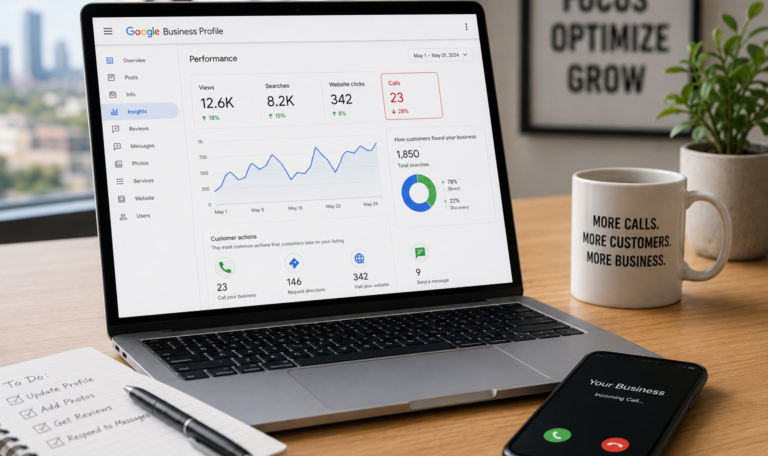
We’ve audited Google Business Profile listings in Houston that sat in the Map Pack at #1 and still produced fewer than five calls a week. In almost every case, the problem wasn’t Google Search visibility, it was what happened after people saw the listing. A Google Business Profile can earn plenty of impressions on the SERP and still lose the customer journey at the last step: the tap on “Call.” That gap is fixable, often without any ranking change. Understand The Real Problem: Visibility vs. Conversion Being “top 3 in Maps” doesn’t guarantee calls because search intent varies wildly even for the same keyword. A person searching “plumber” at 2:00 a.m. wants an immediate answer, while someone searching “plumber cost” may be shopping and saving numbers for later. Competition also changes how people behave in the Map Pack. If the other two listings show stronger trust signals like more recent reviews, clearer services, and better photos, users will skip you even if you rank above them. There are two common failure modes we see in local SEO audits. Not Being Seen (Impressions Problem) This is when your listing barely appears for discovery searches, meaning people who don’t already know your brand aren’t finding you. In the Performance tab, you’ll see low impressions, low actions, and often a narrow set of queries. This usually ties back to keyword relevance, category selection, weak on-page reinforcement, or eligibility issues for service-area business and storefront business setups. Being Seen But Not Chosen (Conversion Problem) This is when impressions are healthy but calls, website clicks, direction requests, or messages stay flat. In that case, your conversion rate from views to actions is the real issue. Set expectations correctly here: more calls can come from profile improvements even if your Map Pack ranking never moves. We’ve seen call volume jump after tightening the Services section, replacing stock photos, and fixing business hours mismatches, with no measurable change in average position. What A “No-Calls” Profile Usually Signals A quiet phone line is rarely mysterious. It usually points to one of two realities. Searchers Don’t Trust The Listing Enough To Tap Call People hesitate when the listing feels incomplete or inconsistent. Missing attributes, thin service details, outdated photos, vague business description text, and weak review recency all create doubt. In Houston markets like Downtown Houston, The Heights, and River Oaks, users often have plenty of options within a few miles. When uncertainty shows up, they keep scrolling. The Listing Is Attracting The Wrong Queries If you’re showing up for low-volume keywords or informational searches, you can rack up impressions without buyer intent. A common example is a service business appearing for “DIY” or “how much does it cost” style queries, then wondering why calls don’t follow. We also see mismatches where a company lists extra services “just in case,” which trains Google to show the profile for the wrong discovery searches. As a result, a Google Business Profile not getting calls may actually be attracting the wrong audience rather than potential customers who are ready to buy. Check Performance Data First (So You Don’t Guess) Start in your Google Business Profile Performance tab, not in your gut. Look at calls, website clicks, direction requests, and messages side by side, because each action reflects a different intent. If calls are down but website clicks are steady, users may want more proof before calling. If direction requests are up but calls are down, you might be a storefront business attracting walk-ins, or your phone experience might be turning people away. Next, compare branded searches vs. discovery searches. Branded searches indicate existing demand for your name, while discovery searches indicate market demand for your services in Houston. If discovery searches are weak, demand may be seasonal, or your keyword relevance signals are off. If discovery searches are strong but actions are weak, you’re dealing with a conversion problem. Finally, look for drops after edits in the Info tab, especially category changes, address edits, or service-area updates. We’ve seen “small” changes trigger temporary re-evaluation, which can reduce visibility and actions for a couple of weeks. Quick Houston Benchmark Questions To Ask Are impressions steady but calls down, or are both down. The first points to conversion, the second points to visibility. A Google Business Profile not getting calls may also be sending the wrong signals to Google. If your actions cluster in places you don’t cover, your service area settings and content cues may be misaligned. Fix The Conversion Killers On Your Profile When a listing ranks but doesn’t convert, the profile content is usually the bottleneck. Treat the profile like a sales page that has to earn a tap in five seconds. Strengthen Your Services Section Your Services section should read like a menu a Houston buyer would recognize. Avoid vague labels and focus on specific offerings, clear outcomes, and what’s included. Examples of stronger service entries: This also reduces friction in the customer journey because the user can self-qualify before calling. Upgrade Photos With Proof, Not Polish Photos are a conversion asset, not decoration. Add recent, real images from job sites, your team in uniform, trucks with signage, your storefront, and before-and-after shots when appropriate. Stock-heavy galleries tend to underperform because they look interchangeable. In competitive areas like the Energy Corridor and Sugar Land, “real” often beats “perfect.” Rewrite The Business Description For Intent Your business description should quickly answer three questions: who you help in Houston, what you do, and why someone should trust you. Include proof points like licensing, years in business, response times, and service boundaries. A strong description also supports keyword relevance without stuffing. Mention core services and a few real service areas naturally, not as a list of neighborhoods. Trust Signals That Directly Influence Calls Fill out attributes that reduce uncertainty, such as payment types, accessibility options, and any industry-specific credentials. Confirm business hours and set holiday hours ahead of time so users don’t call and hit a closed line. Make the call-to-action obvious by using the correct primary phone,..

Follow Us